Loading...
play.sapling.gg
Click to copy IP
Loading...
discord.gg/DPmNfGwXNt
Click to join
Internet Explorer: Internet Explorer is not supported. Please upgrade to a more modern browser.
Last edited by 1tzEmerald · 15 hours ago

Access all official Sapling SMP links here. If you need support or more information, head to the official Discord server below for a quick reply.

Sapling is a cozy, non-competitive Minecraft survival server built around community, creativity and fun. It's a welcoming place to build, explore, and enjoy and enjoy Minecraft together.


Server Information

Server IP: play.sapling.gg
Bedrock Port: 19132

Vote: https://sapling.gg/vote
Store: https://sapling.gg/store
Discord Invite: https://discord.gg/DPmNfGwXNt


The staff team maintains this wiki to help guide both new and experienced members of the community.


17
Last edited by 1tzEmerald · 8 hours ago
1
Launch Minecraft: Java Edition and select Multiplayer.
2
Click Add Server and enter the following:
Server NameAnything you like
Server Addressplay.sapling.gg
3
Click Done — the server will appear in your server list.
1
Launch Minecraft: Bedrock Edition and select Play.
2
Click the Servers tab and enter the following:
Server NameAnything you like
Server Addressplay.sapling.gg
Server Port19132
3
Click Done — the server will appear in your server list.
1
Download MCServerConnector or BedrockTogether on your mobile device.
2
Open the app and enter the following:
Server NameAnything you like
Server Addressplay.sapling.gg
Server Port19132
3
Tap Start Server in the app.
4
Launch Minecraft: Bedrock Edition on your console and select Play.
5
Go to the Friends tab — the server should appear automatically.


9
Last edited by 1tzEmerald · 9 hours ago

For community rule violations you can submit a report by submitting a ticket in our Discord server.

  • Respect Everyone
    • This rule is simple, treat everyone with respect.
      • If someone is being disrespected, report it to us and do not disrespect them back.

  • No Inappropriate Content
    • Keep it clean at all times.
      • Do not post any inappropriate content this includes but not limited to:
        • Usernames, Skins, Item renames, content.
        • Political content/discussions this also includes content regarding global/world conflicts.
        • Sexual explicit content (Instant Perm Ban)

  • No Harassment, Bullying or Hate Speech
    • Respect others how you want to be treated
    • Do not intentionally make people feel uncomfortable
        • Example: If you someone asks you to leave their claims, please do so when asked.
        • Example: Do not excessively spam /tpa requests to another player. (use /settings to disable requests)
        • Example: Do not excessively send private messages to another player. (use /settings to disable requests)

  • No Spamming or use of Excessive Caps
    • No spamming, this one is simple.
      • Do not spam and do not use excessive amount of capital letters. This also includes images, emojis, zalgo and any other kind of formatting.

  • No Advertising
    • Advertising is prohibtied
      • Do not promote other servers or communities that are not apart of the Sapling Network and or its affiliates. This includes but not limited to:
        • Discord text and voice chats
        • Discord DMs
        • In-game chat and private messages
        • Social media posts
      • This also includes the use of advertising through external links and creation of QR codes.
  • Do not share personal information
    • Do not share any personal information of your own. This includes but not limited to:
      • Your full name
      • Your Email/Home address
      • Your Phone number
      • Your Banking details
      • Your Social security / National insurance information
    • Do not share any explicit nsfw content of you or someone else, this includes but not limited to:
      • Sexual imagery (still, video, edited and AI content)

  • Do not threaten a member in any form
    • Threats of any kind is not allowed, this includes but not limited to:
      • DDoS threasts
      • Doxxing
      • General threats
    • This also includes threats that can seen as a "joke"

  • Impersonating another player or staff member is prohibited
    • Do not impersonate, in other words do not pretend to be someone that you are not. This includes but not limited to:
      • Sapling Staff Members
      • Sapling Community Members
      • Law enforcement/Government officials

7
Last edited by 1tzEmerald · 9 hours ago

For gameplay rule violations you can submit a report by submitting a ticket in our Discord server.

  • Griefing and Raiding is not allowed
    • Griefing is not allowed within our SMP server. This means you cannot steal or destroy other player's work. We have logs for everything.
    • If you are asked to leave someone's claim you must do so respectfully. Refusing to do so can be reported under rule violation #3 - No Harassment, Bullying or Hate Speech.

  • Land Claiming
    • When claiming land please ensure you leave an unclaimed buffer zone between other bases. In other words claims must be made 100+ blocks apart from each other to avoid clashing.

      • This rule is enforced for the following reasons:

        • To ensure you are not deliberately preventing others from expending their existing claim.
        • To avoid overlapping or clashing builds, this can lead to disputes or unintentional grief.
        • To preserve server performance and player enjoyment, especially in densely populated areas.

      • Inactive Claims Policy
        • If your claim has been inactive for more than 90 days it is subject for an automatic removal to help:
          • Free up space for active players and community growth.
          • To avoid abandoned/inactive claims creating clutter or blocking new builds.
          • To support the server performance limiting unused regions

  • No Random PvP
    • Engaging in unprovoked PvP is not allowed. You may only initiate PvP with clear consent from all parties involved.
      • This rule is enforced for the following reasons:
        • To promote fair gameplay and protect players from random/suprise attacks.
        • To prevent griefing and harassment through repeated or unwanted combat.
        • To uphold a friendly SMP and cooperative atmosphere.
        • To ensure all PvP interactions are respectful.
  • No Trolling
    • Trolling in any form is not allowed. This includes behaviour intended to provoke, annoy, deceive or disrupt others.
      • This rule is enforced for the following reasons:
        • To preserve a respectful and inclusive community where players feel safe to engage.
        • To prevent toxic behaviour/interactions.

  • No Inappropriate Builds, Usernames or Player Skins
    • All content, including player built structures, usernames and skins must remain appropriate at all times.
      • Inappropriate Usernames and Skins This can result in a permanent ban until you have corrected your account.
      • Inappropriate Builds will be removed from the server with or without warning. (report with the coordinates or set a player warp which a staff member will remove once resolved)

  • Exploiting features/glitches is not allowed
    • Using features, bugs or unwanted mechanics to an advantage is not allowed. This includes but not limited to:
      • Duplicating items
      • Bypassing restrictions
    • This rule is enforced for the following reasons:
      • To keep the servers economy and progression fair.
      • To prevent game breaking issues or instability.
      • To encourage a skill-based game play.
      • To protect the server and players from malicious behaviours or accidental damage.

5
Last edited by 1tzEmerald · 9 hours ago

To ensure a fair and enjoyable experience here on Sapling SMP, we maintain a clear policy regarding what Minecraft mods are allowed to be used in-game. Before we get into whats allowed and what's not allowed, the simple explanation to this is that any modification that gives players an unfair advantage or disrupts the intended gameplay is forbidden. If you are unsure whether a mod is allowed, please don't hesitate to ask our staff team or community before using it.

Allowed Modifications

Mods that are approved to use are as follows:

  • Performance and Visual enhancement mods.
  • Communication Mods
  • Resource packs that do not impact gameplay.
  • Sodium
  • Iris Shaders
  • Entity Culing
  • Voxy / Distant Horizons
  • Flashback / Replay Mod
  • Essential Mod
  • Resource Packs (excluding X-Ray packs)
  • Inventory Sorting Mods
  • Xaero's Minimap
  • Simple Voice Chat
  • Litematica
Information regarding Litematica

Litematica is a client-side mod that helps with building by letting you load schematics as visual guides, then build them yourself with your own materials.

Easy-Place Mode
This feature assists with accurate block placement when you have the required materials in your inventory.

Allowed:

  • Loading and viewing schematics

  • Easy-Place mode for guided building

  • Manual material gathering and placement

Important Notes

  • Auto-tool swapping is disabled, no automatic tool switching.

  • Stay active and move while building (no AFK)

Not Allowed:

  • Printer function (automatic block placement)

  • Feather Client
  • Lunar Client
  • Badlion Client
  • Modrinth
  • Curseforge
  • Prism Launcher

Disallowed Modifications

Mods that are not approved and must not be used are as follows:

  • Mods/Resource Packs that include extra information about world (Example: X-Ray)
  • Mods that alter the movement mechanics. (Fly, speed, smart moving, sprint hacks)
  • All hacked clients or exploit-assist mods.

Examples of disallowed mods/clients:

  • Any and all hack clients. This includes but not limited to:
    • Meteor Client
    • Wurst
    • LiquidBounce
    • DoomsDay
  • Any and all resource packs. This includes but not limited to:
    • X-Ray

General Guidelines

  • If a mod is not clearly listed above, and it could affect gameplay and create unfair advantages, assume it is disallowed.
  • When in doubt, always ask our staff or community before installing the mod.
  • Violating the modifications policy may result in a disciplinary action.

Automation of the Player

  • All players must be in direct control, active control of your character at all times. Any method that causes yyour character to act, move or progress without continuous manual player input is strictly forbidden. This includes but is not limited to:
    • Auto Clickers (software or hardware based).
    • Macros and scripts that automate repeated actions.
    • Baritone or similar pathing/botting mods.
    • Key weighting or any physical method of holding a key down on your behalf.
Farming Rules

Not all farms are treated equally. The following guidelines clarify what is and isn't allowed:

Farming Rules
Not all farms are treated equally. The following guidelines clarify what is and isn't permitted:

Allowed:

  • Full automatic farms for standard vanilla resources (example: Iron, crop and tree farms)
  • Farms that produce resources passively without requiring a repeated player input

Not Allowed

  • Fully automatic or semi-automatic farms used to grind XP or in-game currency (example: fishing machines, automatic mob grinders)
  • Farms that require holding down a single key or repeating the same motion endlessly to function
  • Mob grinders where mobs kill themselves via thorns armor, fall damage or other passive means to benefit the player.

5
Last edited by 1tzEmerald · 9 hours ago

Player Market

For more information regarding how markets work
/market Opens the main player market menu.
/offer <price> Places the item you are holding into the player market.

Help Commands

/menu Opens the main menu, this is a menu to give you quick access to certain features.
/profile Opens up your player profile, This gives you quick access to the following:
  • Jobs
  • Cosmetics
  • Stats
  • Settings

General Commands

/claim Opens the claim menu
/rtp Randomly teleport to a random location.
/warps Show the list of server warps available.
/msg [player name] [message] Send a private message to another player.
/msgtoggle Enable/Disable recieving messages from another player.
/tptoggle Turn off teleportation requests.
/rewards Opens the daily rewards menu
/vote Opens the server vote menu, this is where you can vote and view progress on your voting ranks.

Home Commands

/home [home name] Teleports you to your home location.
/homes List all your homes.
/sethome [home name] Sets your current location as your home.
/delhome [home name] Deletes one of your set home locations.

Player Advancement Commands

/jobs Opens the jobs menu.
/skills Opens the skills menu.
/quests Opens the quests menu.

Economy Commands

/bal or /balance Views your current money balance.
/pay [player name] [amount] Gives money to another player.
/trade [player name] Trade money and or items with another player.
/points Views your current saplings balance.
/shop Open the shop.

Teleport Commands

/tpa [player name] Send a teleport request to another player.
/tpahere Sends a teleport request to another player to teleport to your location.
/tpa cancel Cancels a teleport request that you sent to a player,
/tpa accept Accept a teleport request from another player.

/tpa deny Deny a teleport request from another player.

7
Last edited by 1tzEmerald · 3 hours ago

This category gives you access to our supporter ranks. Purchasing a donator rank will give you some new perks, commands and kits alongside supporting the servers lifetime and development.

Acacia Oak Blossom

$7.99 USD

Lifetime

$19.99 USD

Lifetime

$29.99 USD

Monthly

Kit

Acacia Kit

Oak Kit

Blossom Kit

Reward

Weekly

Weekly

[++]

Player Glow

Yes

Yes

Yes

Tag & Color

Yes

Yes

Yes

Vaults

6

8

12

Homes

10

12

14

Player Warps

 6

 12

 14

Claim Flags

6

12

14

Market Item Offers

10

12

14

Minion Slots

10

12

14

Player Shelf Shops

70

100

140

Sign Colors &
Formatting Codes

Yes

Yes

Yes

/recipe

Yes

Yes

Yes

/grindstone

Yes

Yes

Yes

/smitingtable

Yes

Yes

Yes

/stonecutter

Yes

Yes

Yes

/hat

Yes

Yes

Yes

/near

Yes

Yes

Yes

/feed (24hr cooldown)
(disabled during PvP combat)

No

Yes

Yes

/disposal or /trash

No

Yes

Yes

/top

No

Yes

Yes

/anvil

No

Yes

Yes

/loom

No

Yes

Yes

/itemrename

No

Yes

Yes

/nickname

No

Yes

Yes

Nickname Color Codes

No

No

Yes

/fix (24hr cooldown)
(disabled during PvP combat)

No

No

Yes

/heal (24hr cooldown)
(disabled during PvP combat)

No

No

Yes

/pweather

No

No

Yes

/ptime

No

No

Yes

/zheads

No

No

Yes

/enderchest

No

No

Yes

/extinguish

No

No

Yes

Claim Flags

Acacia Rank

  • NoFluidFlow - Prevents the flow of water and lava.
  • NoLeafDecay - Prevents leaves from decaying.
  • NoIceForm - Prevents ice from melting.
  • NoSnowForm - Prevents snow from melting.
  • NoFireSpreads - Prevents fire from spreading.
  • NoMonsterSpawns - Stops selected enemy mobs from spawning.

Oak Rank

  • NoFluidFlow - Prevents the flow of water and lava.
  • NoLeafDecay - Prevents leaves from decaying.
  • NoIceForm - Prevents ice from melting.
  • NoSnowForm - Prevents snow from melting.
  • NoFireSpreads - Prevents fire from spreading.
  • NoMonsterSpawns - Stops selected enemy mobs from spawning.
  • NoGrowth - Prevents the growth within your claim.
  • NoMobDamage - Prevents players in your claim from enemy mob damage.
  • NoFallDamage - Prevents players from fall damage in your claim.
  • NoEnderPearl - Prevents players from using ender pearls in your claim.
  • NoChorusFruit - Prevents players from teleporting when they eat chorus fruit.
  • NoBlockFade - Prevents blocks from fading (Eg. Copper states)

Blossom Rank

  • NoFluidFlow - Prevents the flow of water and lava.
  • NoLeafDecay - Prevents leaves from decaying.
  • NoIceForm - Prevents ice from melting.
  • NoSnowForm - Prevents snow from melting.
  • NoFireSpreads - Prevents fire from spreading.
  • NoMonsterSpawns - Stops selected enemy mobs from spawning.
  • NoGrowth - Prevents the growth within your claim.
  • NoMobDamage - Prevents players in your claim from enemy mob damage.
  • NoFallDamage - Prevents players from fall damage in your claim.
  • NoEnderPearl - Prevents players from using ender pearls in your claim.
  • NoChorusFruit - Prevents players from teleporting when they eat chorus fruit.
  • NoBlockFade - Prevents blocks from fading (Eg. Copper states)
  • NoItemPickup - Prevent players from picking up items in your claim.
  • NoItemDrop - Prevent players from dropping items in your claim.
  • NoBlockSpread - Prevent blocks from spreading within your claim.
  • NoAnvilDamage - Prevent players from taking damage from anvils.
  • InfiniteArrow - Arrows that are you shot within the claim, will return to the player.
  • NoBlockGravity - Prevents block gravity within the claim. (Eg. falling sand/gravel)
  • ExitActionBar - Sends the claim exit message in the player's action bar.
  • EntryActionBar - Sends the claim entry message in the player's action bar.

9
Last edited by 1tzEmerald · 3 hours ago

Sapling is a community-driven SMP server. Linking your Discord account is not required but highly recommended. This helps us make sure our community is safe, friendly and respectful. The process to linking is simple and helps us get to know you better.


1. Join our Discord server and run the command /link with Sprout Link.

2. You will receive a response with a link command and code, Copy the command and it's code that you receive from bot and connect to the server. You should receive something like: /link <a-code>

image.png

3. Join the server play.sapling.gg > Paste the command containing the sync code you received.

  • Click on "Multiplayer"
  • Click the "Add Server" button
  • In Server Name, put Sapling
  • In Server Address, put play.sapling.gg
  • Click on "Done"

Once connected to the server, paste the command containing the sync code into the server chat.

You're all set!


7
Last edited by 1tzEmerald · 3 hours ago

Refer a friend to Sapling SMP and you'll both get rewarded.


To claim your rewards, your friend needs to run the following command:

  • /referrals redeem <your username>

Commands

  • /referrals check - Checks how many players you have referred.
  • /referrals redeem <Username> - Redeems a referral reward.
  • /referrals leaderboard - Displays the top 10 players with the most referred players.

Rewards

  • Referrer: $500 + 250 Sapling Coins + 1 Common Key
  • New Player: $2,000 + 100 Sapling Coins + 1 Common Key
Referrals Rewards
5 $15,000 + 750 Saps + 1 Epic Key
10 $30,000 + 1,500 Saps + 1 Legend Key
25 $75,000 + 3,000 Saps + 2 Legend Keys
50 $150,000 + 6,000 Saps + 3 Legend Keys + 3 Epic Keys


2
Last edited by 1tzEmerald · 3 hours ago

Voting is a simple and effective way to help support Sapling and help the community grow. When you vote for us on various server listing sites, you would help us improve the visibility of Sapling.

For every vote you cast you will crawl closer to climbing the voting ranks starting at Vote Rank I. As you continue vote consistently, you unlock higher-tier ranks with perks ranging from sell boosters and Sapling Coins.


Although, Voting Ranks don't change on every vote you'll also receive the following on every vote you send in:

  • 1x Common Crate Key - This can be used at /warp crates
  • $250 (In-Game) Money per each vote.
  • 25 EXP
  • 5 Sapling Coins

How do I vote?

  • You can run the command /vote in-game and click on the book icon to view the voting links.
  • Go to https://sapling.gg/vote/ and you'll see all the active voting links.

2
Last edited by 1tzEmerald · 3 hours ago

Daily rewards are a way for you to get some rewards every day you login into the server. These rewards are available to all players.


How do I claim my Daily rewards?

  • To claim your daily rewards, you can either:
    • Go to spawn (/spawn) turn right and look for the Claim Rewards npc.
    • Use the command /rewards to open the menu directly from any location.

1
Last edited by 1tzEmerald · 34 minutes ago

Land claiming is made simple here, everything has been put behind an in-game making claim creation and claim management super simple. All you need to do is run the 1 command /claim and everything is there for you!


  • All players will start with a 10,000 claim blocks.
/claim
/kit claim Using the golden shovel system. See How to create a secure claim video for further assistance.
/claim - Open the main claim menu.
  • /gpclaim
  • /claimui

Commands

If you prefer using commands over a GUI menu, see the below for a full list commands:

/claim create [radius]
Create a new claim.
Aliases
/claimcreate /gpclaimcreate
/claim list [parentID]
Open the claim list menu.
Aliases
/claimlist /claimslist
/claim info [claimID]
Open the claim info menu.
Alias
/claiminfo
/claim claimblocks
Open the claim blocks menu.
Alias
/gpclaimblocks
/claim purchase [amount|selector]
Purchase claim blocks or open the selector menu.
Alias
/gpclaimpurchase
/claim sell [amount|selector]
Sell claim blocks.
Alias
/gpclaimsell
/claim tp <claimID> [player]
Teleport to a claim.
Alias
/gpclaimtp
/claim warp <claimID>
Warp to a claim.
Alias
/gpclaimwarp
/claim fly
Toggle claim flight.
Aliases
/gpclaimfly /claimfly
/claim leave <claimID>
Leave a claim.
Alias
/gpclaimleave
/claim unclaim <claimID>
Unclaim your claim.
Alias
/gpclaimunclaim
/claim trust player
Open the trust menu or trust a player.
Alias
/gpclaimtrust
/claim distrust player
Open the distrust menu or remove trust from a player.
Alias
/gpclaimdistrust
/claim trustlist [claimID]
Open the trust list.
Alias
/gpclaimtrustlist
/claim trustgui [player]
Open the trust GUI.
Alias
/gpclaimtrustgui
/claim invites [claimID]
Manage claim invites.
Alias
/gpclaiminvites
/claim accept [claimID]
Accept a claim invite.
Alias
/gpclaimaccept
/claim decline [claimID]
Decline a claim invite.
Alias
/gpclaimdecline
/claim revokeinvite [player]
Remove a pending invite.
Alias
/gpclaimrevokeinvite
/claim transfer [player]
Transfer claim ownership.
Alias
/gpclaimtransfer
/claim trustset <player> <claimID> [perm]
Set trust with an optional permission value.
Alias
/gpclaimtrustset
/claim kick player [claimID]
Kick a player from the claim.
Alias
/gpclaimkick
/claim ban player [claimID]
Ban a player from the claim.
Alias
/gpclaimban
/claim unban player
Unban a player from the claim.
Alias
/gpclaimunban
/claim whitelist player [claimID]
Whitelist a player for the claim.
Alias
/gpclaimwhitelist
/claim unwhitelist player [claimID]
Remove a player from the whitelist.
Alias
/gpclaimunwhitelist


1
Last edited by 1tzEmerald · 1 minute ago

Skills are a fun way progress your character as they allow you to become stronger and unlock special abilities. You will earn skill related XP within the related skill.

Getting Started with Skills

Firstly, to access your skills use the command:
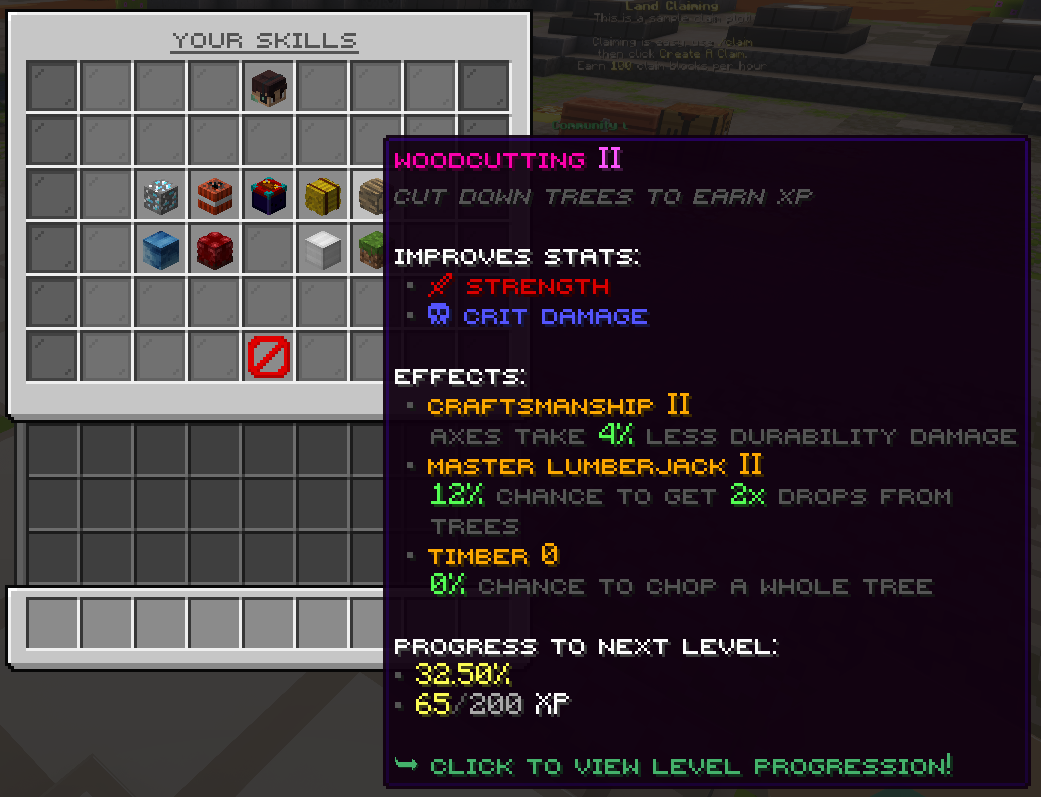
Skill Menu
Skill Menu
Skill Progression Tree for Mining
Skill Progression Tree for Mining (Level 1 View)

This command opens the skills menu and lets you view your overall progress.

  • See your current skill levels by moving your mouse across each skill.
  • View your skill statistics by hovering over your player head.
  • Check your experience progress toward the next level for each skill.
  • Click any skill to open its progression tree.
Alchemy
Craft and use potions to enhance gameplay, combat, and utility effects.
Archery
Improve ranged combat with bows and crossbows for precision and damage.
Armory
Boost armor effectiveness and durability for better protection.
Combat
Enhance melee fighting capabilities, including damage and critical hits.
Enchanting
Increase enchant success rates and unlock advanced enchantments.
Exploration
Gain bonuses for traveling, discovering biomes, and navigating terrain.
Farming
Improve crop yield, growth speed, and farming efficiency.
Fishing
Unlock rare catches and improve fishing speed and loot quality.
Mining
Increase ore yield, mining speed, and rare drop chances.
Woodcutting
Boost log harvesting speed and chances for bonus drops.


2